
Somewhere in your comments right now, a viewer is waiting on an answer. Maybe they asked which microphone you use, whether the tutorial works on a Mac, or when part two is coming. Once your videos get more than a few dozen comments, those questions get buried fast, and scrolling the whole feed to find them is nobody's idea of a good afternoon.
Short answer. In YouTube Studio on a computer, select Community, stay on the Published tab, and use the filter bar: set Response status to the comments you haven't responded to, then add the Questions filter. In the Studio mobile app, open Community, tap View all, and choose Unresponded under response status. Answer the most-liked and most recent questions first.
The backlog is usually bigger than creators expect. In the study behind The YouTube Comment Report 2026, which covered 9,877,019 public comments, 81.2% of viewer questions at least seven days old had no creator reply, and only 11.7% received a complete answer.
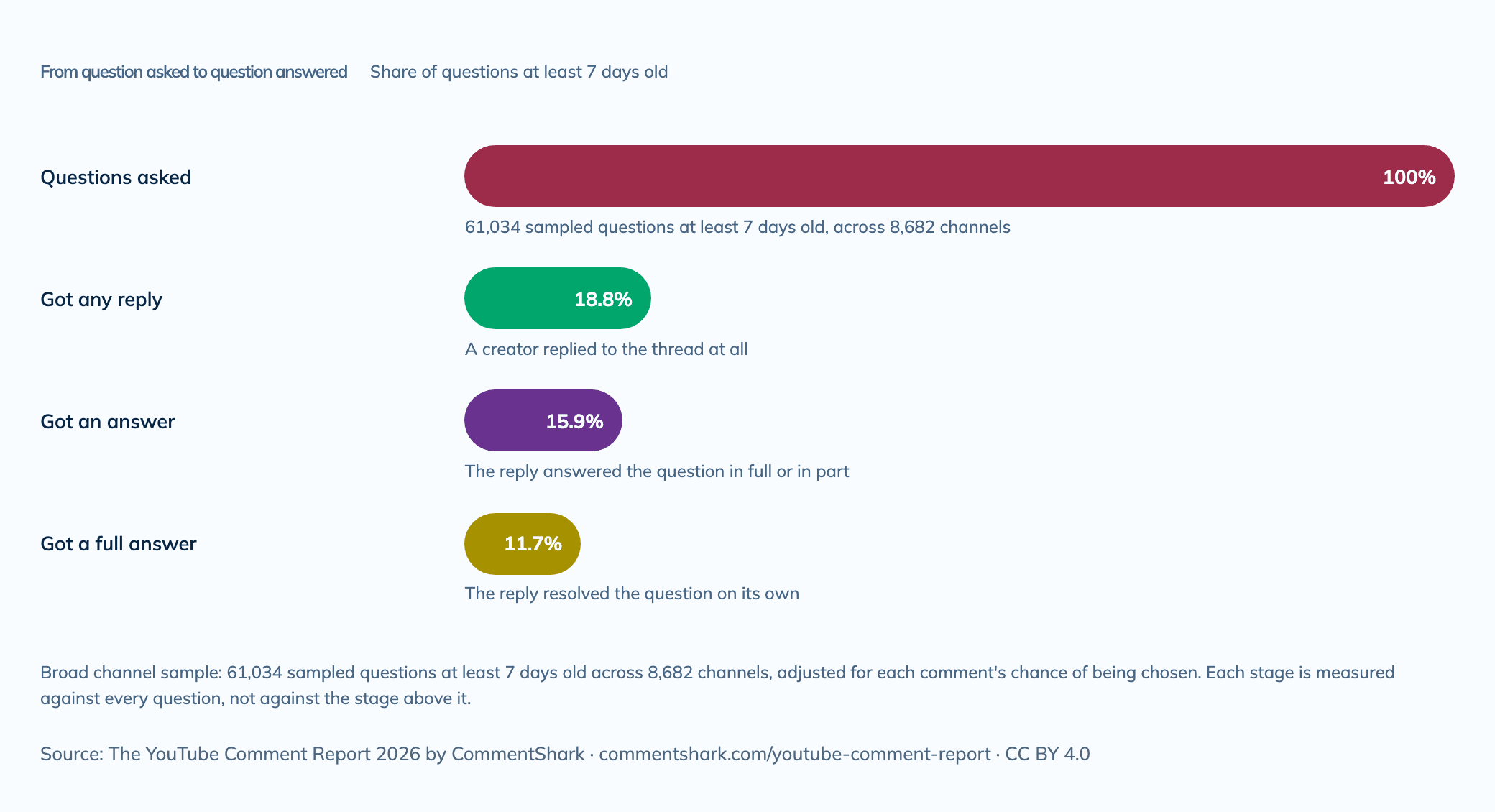
Each stage is measured against every question, not against the stage above it. Source: The YouTube Comment Report 2026, which has this chart's data and embed code.
The good news is that YouTube Studio now does most of the finding for you. This guide walks through the exact filters on desktop and mobile, what they do and don't tell you, how to decide which questions to answer first, and when it makes sense to let rules handle the questions you keep getting.
How to Find Unanswered Comments in YouTube Studio on a Computer
Studio on a computer has the most complete set of comment filters. Here is the workflow, based on YouTube's guide to reviewing and replying to comments:
- Open Community. Sign in to YouTube Studio and select Community from the left menu. You'll see comments from across your channel.
- Stay on the Published tab. Published holds the comments everyone can see. Held contains comments waiting on your moderation settings and ones YouTube held as likely spam, so check it separately.
- Filter by response status. Click the filter bar at the top of the tab, choose Response status, and pick the option for comments you haven't responded to.
- Add the Questions filter. Stack it on top so the list narrows to comments YouTube recognizes as questions.
- Narrow to one video when it helps. Open the comments for a single upload when you want to clear it completely, such as a launch video or a tutorial that keeps getting the same question.
That stack, unanswered plus questions, is the list most creators actually want. Reply from the same screen, work down the list, and you can clear a week of questions in one sitting.
Search Comments by Topic, Not Just Keywords
Studio's comment search, added in March 2026 according to our YouTube comment features changelog, is more useful than most creators realize. It lives in the same filter bar, and according to YouTube's documentation it uses AI to match the meaning behind a comment as well as the exact words. That matters because plenty of questions never use a question mark. "I'd love to know your mic setup" is a question. So is "wondering if this works on a Mac."
- Type a topic, not a keyword. Queries can be up to 100 characters, so try something like "questions about my equipment" or "asking when the next part comes out."
- Use suggested topics. Studio offers ready-made themes, such as negative feedback, that pull up related comments in one click.
- Find similar comments. When you spot a question you know you've seen before, open the three-dot menu on that comment and choose Find similar comments to pull up everyone else asking the same thing.
Know the limits. Topic and similar-comment matching cover the last 90 days, while keyword matches cover all comments. You can't search for comments from a specific person, and search is only available in Studio on a computer. For a quick read on a single video, the Get summary button at the top of its comments gives an AI summary of how viewers responded, including feedback worth acting on.
How to Find Unanswered Comments in the YouTube Studio App
On your phone the workflow is shorter, which makes it ideal for clearing a few questions between other things. The steps are the same on iPhone and Android, per YouTube's mobile instructions:
- Open Community. Open the YouTube Studio app and tap Community in the bottom menu.
- Tap View all. Published comments show by default.
- Filter to Unresponded. Tap the filter bar, and under response status choose Unresponded.
Response status is multi-select in the app, with three options: Unresponded, Responded, and New replies to your response. That last one is worth checking regularly. It shows viewers who answered you back, which is often a follow-up question from someone who is already engaged. YouTube's mobile instructions don't mention a questions filter or comment search, so save topic searches for your desk.
What the Unanswered Filter Does and Doesn't Tell You
Response status tracks one thing: whether your channel has replied. That's useful, but it isn't the same as "this viewer still needs help." Keep four gaps in mind when you work the list.
- Another viewer may already have answered. A question with a good answer from your community still counts as unresponded. Skim the thread first; sometimes a heart on that viewer's answer is all it needs.
- A reply isn't always an answer. A quick "thanks!" under a question moves it out of Unresponded without helping anyone. The report's 11.7% complete-answer rate is a reminder that replying and answering are different things.
- Not every question looks like one. Treat the Questions filter as a starting point and pair it with a topic search for the questions your audience asks in other words.
- Held comments sit on their own tab. Filters on the Published tab don't show them. If your moderation settings are strict, a real question can wait in Held, so glance at that tab before each sweep.

Which Unanswered Questions to Answer First
Once the filter is on, you'll probably have more questions than time. Sort them into three groups and work from the top.
Answer Now
- Questions with likes. Every like is another viewer who wants the same answer, so one reply helps many people.
- Questions on recent videos. The conversation is still active, and the commenter may get a notification when you reply, so your answer is likely to be seen.
- Questions from regulars. Studio shows badges next to top commenters, channel members, and publicly subscribed commenters. Those viewers have already invested in your channel.
- Questions that reveal confusion about the video. If one person misunderstood a step, others did too. Answer it, then consider pinning the answer.
Answer This Week
- Follow-ups and deeper questions from viewers who want to go further than the video did. These often turn into the best threads on the video.
- Gear, software, and product questions. They're quick to answer, and if you link the product, they're strong candidates for an automated reply later.
- Questions on evergreen videos. Videos that keep getting views keep showing your answers to new viewers.
Batch or Skip
- Questions a quick search would answer that have nothing to do with your expertise. A short reply is fine, but don't feel obligated.
- Rhetorical and joke questions. Not every question mark needs a reply.
- Old questions on quiet videos. Six months on, on a video with little traffic, your time is better spent on the first group.
For a fuller system that covers praise, criticism, and spam alongside questions, see our YouTube comment triage system.
Stop Answering the Same Question Fifty Times
If your sweeps keep turning up the same handful of questions, the fix isn't faster typing. Put the answer where viewers will see it before they ask.
- Pin the answer. If a video will predictably generate a question, pin a comment with the answer on day one. Our guide to pinning and hearting YouTube comments shows how.
- Add chapters. Many "when did you mention X?" questions disappear when viewers can jump straight to the section. YouTube explains the setup in its video chapters guide.
- Link resources in the description. Gear lists, downloads, and products you mention cut down on "where can I find this?" questions.
- Make an FAQ video when the same ten or fifteen questions follow you across uploads, and point to it from your pinned comments.
Studio can also speed up the replies themselves. Comment reply suggestions appear under comments, and some are upgraded with AI to match the tone and style of your recent replies. They're optional, and you still pick, edit, and send each one yourself.
When Studio Isn't Enough: Let Rules Handle the Repeats
For many channels, a weekly sweep in Studio is all you need, and if that's you, there's no reason to add another tool. It starts to break down when the same questions arrive every day across many videos, or when a question deserves an answer while you're asleep.
That's the job CommentShark's comment automation was built for. You write each rule as a plain sentence: when a comment matches, do this. A rule can match on keywords, or on AI detects, where you describe the comment in plain English ("a viewer asking which microphone I use"). The action can be a reply from a template you wrote, including an approved link, a reply written by AI from your instructions, or just an email to you so you can answer personally.
You stay in control of what gets posted. Set a rule to run after approval and every drafted reply waits for you to post, edit, or reject it. Rules also never touch a thread you've already replied to by hand. Our guide to approval versus autonomous mode covers when to let a rule run on its own, and the guide to automating FAQ replies walks through a first rule.
The Comments tab in CommentShark follows the same workflow as Studio for the comments it has synced: a Response status filter for comments you haven't replied to, an Is question filter (question marks, plus comments our classifier tagged as questions on paid plans), and sorting by like count so the most-wanted answers rise to the top. It keeps synced comments for up to 30 days, so for an older backlog, Studio's filters are the better tool. If you use Claude, the CommentShark connector can pull your unanswered questions into a conversation and group them by theme.
Not sure how big your backlog is? The free comment audit reads up to 300 recent public comments from your latest videos and reports how many questions are going unanswered. It's a sample, not a full count, but it's a fast reality check.
A Weekly Routine That Keeps the Backlog Small
Daily (5 Minutes): Clear Fresh Questions
On your phone, filter to Unresponded and New replies to your response, and answer what you can on your newest videos. Five minutes a day keeps the recent questions from ever becoming a backlog.
Weekly (20 to 30 Minutes): Sweep With Studio's Filters
At your desk, stack Response status and Questions on the Published tab, then run two or three topic searches for the questions your audience phrases differently. Work through the Answer Now group, then Answer This Week. Check the Held tab while you're there. If this sweep fits in that time, Studio may be all you need; our guide to when YouTube Studio is enough covers the signs that change.
Monthly (15 Minutes): Turn Repeats Into Fixes
Look back at what came in. Which questions showed up five times or more? Each one is a candidate for a pinned comment, a line in your descriptions, an auto-reply rule, or a video of its own. Our guide to using YouTube comments as customer research goes deeper on turning them into content ideas.
Frequently Asked Questions
Can YouTube Studio show only the comments I haven't replied to?
Yes. In Studio on a computer, open Community and use the Response status filter on the Published tab. In the Studio app on iPhone or Android, open Community, tap View all, and choose Unresponded under response status.
Can you search YouTube comments in Studio?
Yes, on a computer. The search in Studio's filter bar matches keywords and also uses AI to find comments by topic or meaning, with queries up to 100 characters. Topic matching covers the last 90 days, and you can't search for comments from a specific user.
Does Unresponded include questions other viewers already answered?
It can. Response status tracks whether your channel replied, not whether the question has an answer. Skim the thread before writing a full reply; a heart on a viewer's good answer is sometimes enough.
Does replying to comments help my video get recommended?
YouTube doesn't publish a rule that replies boost recommendations. The reliable payoff is direct: the viewer may get a notification that you replied, and everyone who reads the thread later sees the answer. We cover the bigger picture in do YouTube comments affect the algorithm.
How do I stop getting the same question over and over?
Answer it where viewers look first: a pinned comment, the description, or chapters. For questions that keep coming anyway, an auto-reply rule can answer each one with a reply you approved, or hold a draft for you to review first.
Keep answering the questions only you can answer, and let rules handle the ones you've already answered fifty times. Test a rule on your own comments and start with approval on.
See How Auto-Reply Rules Work