
Watch a channel with a million subscribers and the comment section looks impossibly well tended: questions answered, jokes hearted, a pinned reply steering the conversation. So how do YouTubers reply to so many comments without spending their whole day scrolling? The honest answer is that they do not reply to every comment. They reply to the right ones, fast, and lean on a few repeatable moves for the rest. This guide breaks down the real manual playbook, then shows the system that lets you keep it up at thousands of comments a video with an AI comment assistant doing the heavy lifting.
Short answer. Big YouTubers do not reply to every comment. They reply fast in the first hour, heart and pin to steer the conversation, then triage: personal replies go to real questions and superfans, hearts or nothing for the rest. Tools like CommentShark automate that routine layer so your human replies land where they matter.
The data backs this up. Across 15,403 channels we studied, the median creator reply rate falls from 6.5% at 1,000 to 10,000 subscribers, to 1.6% at 10,000 to 100,000, and to 0% above 100,000. See The YouTube Comment Report 2026 for the full picture.
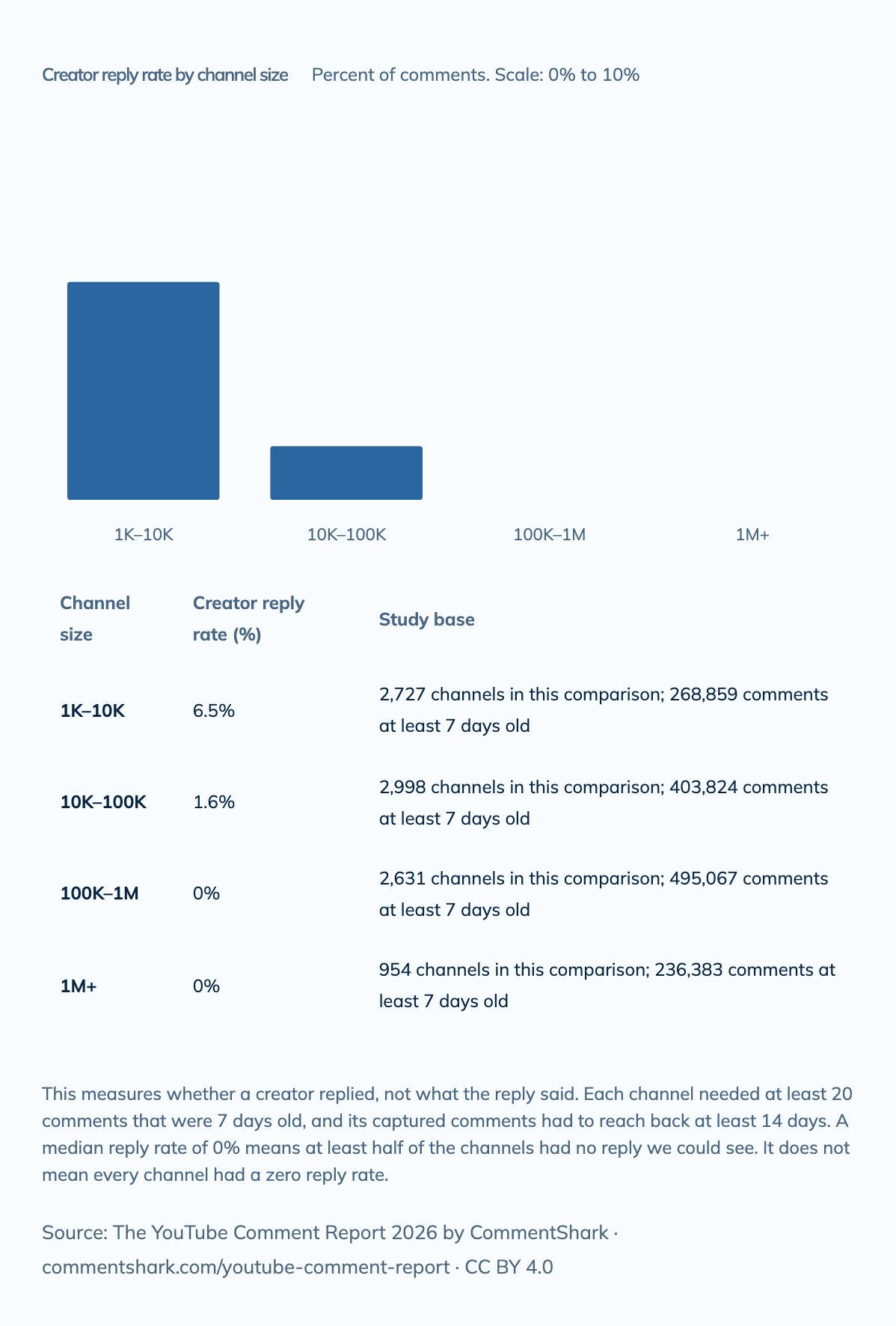
A median of 0% means at least half of the larger channels had no reply the study could see, not that every one of them had none. Source: The YouTube Comment Report 2026, which has this chart's data and embed code.
The manual playbook top creators actually run
None of this is secret. The moves below are just done consistently and quickly, which is what separates a channel that feels alive from one that feels abandoned. YouTube itself builds most of these into the tools, and its official guidance on interacting with viewers spells out how each one works.
- Reply in the first hour. Creator guides are consistent on this: aim to respond within 24 hours, and ideally within the first hour after publishing, when YouTube is actively testing the video and early engagement matters most.
- Heart the friendly ones. A creator heart takes about two seconds and sends the viewer a notification that the channel owner loved their comment. It is the perfect move for the pile of "great video!" comments that do not need a typed reply.
- Pin one comment to steer the room. You can pin exactly one comment at a time, and it stays at the top of the feed. Smart creators pin a sharp question or an answer to a frequent one, so the pin absorbs repeat questions before they get asked.
- Prioritize questions and superfans. Real questions and thoughtful long comments get a genuine typed reply. The regulars who show up on every video get recognized by name. Trolls get skipped entirely.
- Batch, do not drip. The YouTube Studio app collects comments from every video into one inbox, which is far faster than opening each video. Most creators reserve a block of time and clear it in one pass rather than checking all day. Our guide to replying to YouTube comments shows the Studio filters that make that pass fast.
- Accept you cannot get to everyone. Even replying to the first 25 to 50 comments on a video tells your audience the comment section is a conversation, not a suggestion box.
Why bother at all past a certain size? Because replies do real work. As vidiq notes in its guide to responding to comments, a reply sparks follow-up comments and longer threads, and YouTube counts that back-and-forth as engagement. A hearted or answered comment near the top of a fresh video also nudges other viewers to join in. It compounds.
Where the manual playbook quietly breaks
Here is the part generic listicles skip. The playbook above works beautifully up to a point, and then it does not. At a few hundred comments per video you can hand-triage. At a few thousand, the math stops working: even at ten seconds a comment, three thousand comments is more than eight hours of clicking. So creators quietly drop the tail, and the routine stuff, the "what mic do you use," the "link in the description," the same three FAQs on every upload, either gets a copy-pasted answer or gets ignored. That is a shame, because most of what lands in a big comment section is predictable. Think of it as an 80/20 split: roughly four out of five comments are routine and answerable with a known reply, and the remaining fifth are the real conversations worth your personal time.
The trick that big, well-run channels use is not superhuman speed. It is a system that handles the predictable majority automatically so the creator only ever touches the meaningful minority.
The system: rules, AI replies, and an approval queue
This is the layer CommentShark adds on top of the manual playbook. It manages your own comment section only: it never posts on other people's videos, and it is not an auto-commenter. Here is how to set it up so replying to (almost) every YouTube comment becomes realistic again.
- 1. Write rules for the routine 80 percent. A rule matches comments by keyword, by regex, or by AI intent. "Any comment asking which camera I use" or "any comment that is just praise" becomes one rule with one job.
- 2. Let AI draft the reply in your voice. Replies are trained on your past replies and your channel context, so a drafted answer sounds like you, not like a support bot. The same FAQ can get ten slightly different genuine answers instead of one obvious copy-paste.
- 3. Choose approval queue or autonomous per rule. This is the important knob. High-trust rules (thanking praise, answering a settled FAQ) can post on their own. Anything you are unsure about drops into an approval queue where you skim and approve in a batch. Our guide on approval vs autonomous mode covers when to use each.
- 4. Reserve your human time for the 20 percent. With the routine layer handled, the questions, the superfans, and the thoughtful comments are all that is left in front of you, and now you actually have time to reply to them well.
The result is the well-tended comment section you see on big channels, minus the eight hours of scrolling. Fast coverage on the routine stuff, real replies where they count.
Auto-moderate the noise so replies go to real people
There is a second reason big comment sections stay clean: the junk never makes it to the creator's eyes. Scam links, crypto shills, impersonator "I have a gift for you" replies, and slurs get filtered out automatically, 24/7. CommentShark can hide or delete spam and scam comments, run blocked-words lists, and apply AI hate and scam detection so you are not moderating by hand at 2am. Pair that with a moderation setup and, if you want to see what your section actually contains first, a free comment audit that surfaces the unanswered questions, sentiment split, and spam load hiding in your last few videos.
A realistic weekly workflow at thousands of comments
If you want a concrete routine to manage thousands of YouTube comments without it eating your week, it looks like this:
- At publish: spend the first 30 to 60 minutes live in the comments, hearting and replying to the early wave by hand. This window matters most for engagement, and no automation replaces you being present here.
- Pin your steer: pin a question or an FAQ answer before you step away, so the conversation has direction while you are gone.
- Let rules run the routine: your keyword and intent rules quietly handle the FAQs, praise, and link requests as new comments roll in over the next days.
- Clear the approval queue once a day: batch-review the AI drafts, approve the good ones, tweak or skip the rest. Five minutes, not five hours.
- Moderation runs itself: spam and scams are hidden before you ever see them, so your inbox is real humans only.
You do not need an enterprise plan to start. The free plan is permanent (3 rules, 20 automated actions/mo, AI included), which is enough to automate a couple of FAQs and see the approach work, and paid plans run from $19/month when your comment volume outgrows it.
Frequently Asked Questions
How do YouTubers reply to so many comments?
They do not reply to every comment manually. Big creators reply fast in the first hour, heart the friendly ones (a two-second action that notifies the viewer), pin one comment to steer the conversation, and give real typed replies only to questions and regular commenters. At high volume they add rules and AI-assisted replies to cover the routine, repetitive comments so their own time goes to the meaningful ones.
Should you reply to every YouTube comment?
For a small channel, replying to most comments is a great growth move because replies spark follow-up threads that YouTube counts as engagement. As you scale, replying to literally every comment stops being realistic. The practical target is to reply to the questions and thoughtful comments, heart or auto-handle the routine ones, and skip trolls entirely.
Does replying to comments help the YouTube algorithm?
Indirectly, yes. A creator reply tends to spark more replies and longer threads, and YouTube treats that back-and-forth as engagement on the video, per creator guides like vidiq's. Hearting and pinning also make a fresh comment section feel active, which encourages more viewers to join in. It is not a magic ranking lever, but an alive comment section reinforces the early engagement signals YouTube is looking for.
Can I automate YouTube comment replies without sounding robotic?
Yes, if the tool learns your voice. CommentShark trains AI replies on your own past replies and channel context, so a drafted answer reads like you rather than a generic "Thanks for watching!" You can also route uncertain replies through an approval queue so nothing posts without a glance. Paid plans start at $19 a month, and the free tier includes AI so you can test the tone first.
Automate the routine 80 percent and give your real replies to the 20 percent that matter. Rules, voice-matched AI replies, an approval queue, and 24/7 spam moderation, all on your own channel.
Set up your comment assistant